RCWeb YouTube Controls
The RCWeb YouTube Controls app (app/youtube-c) is the phone and tablet controller for the RCWeb YouTube Display (app/youtube).
Features
- Add video links and reorder the queue.
- Play, pause, seek, skip, loop and change volume.
- Download/import playlists and control display overlays.
Screenshot
Overview
This app gives users a YouTube-style remote control surface for every active youtube display in the same RCWeb room. It can add videos, manage the playlist, control playback, adjust audio, toggle display overlays, and save or restore playlist files.
Multiple phones can use the control app at the same time. Each controller receives display state updates and can contribute to the shared queue.
How to use
- Open
/youtube/on the main display. - Scan the QR code shown by the display.
- Paste a YouTube video URL into the YouTube URL box.
- Press Add to queue. If the queue was empty, playback starts from the first item.
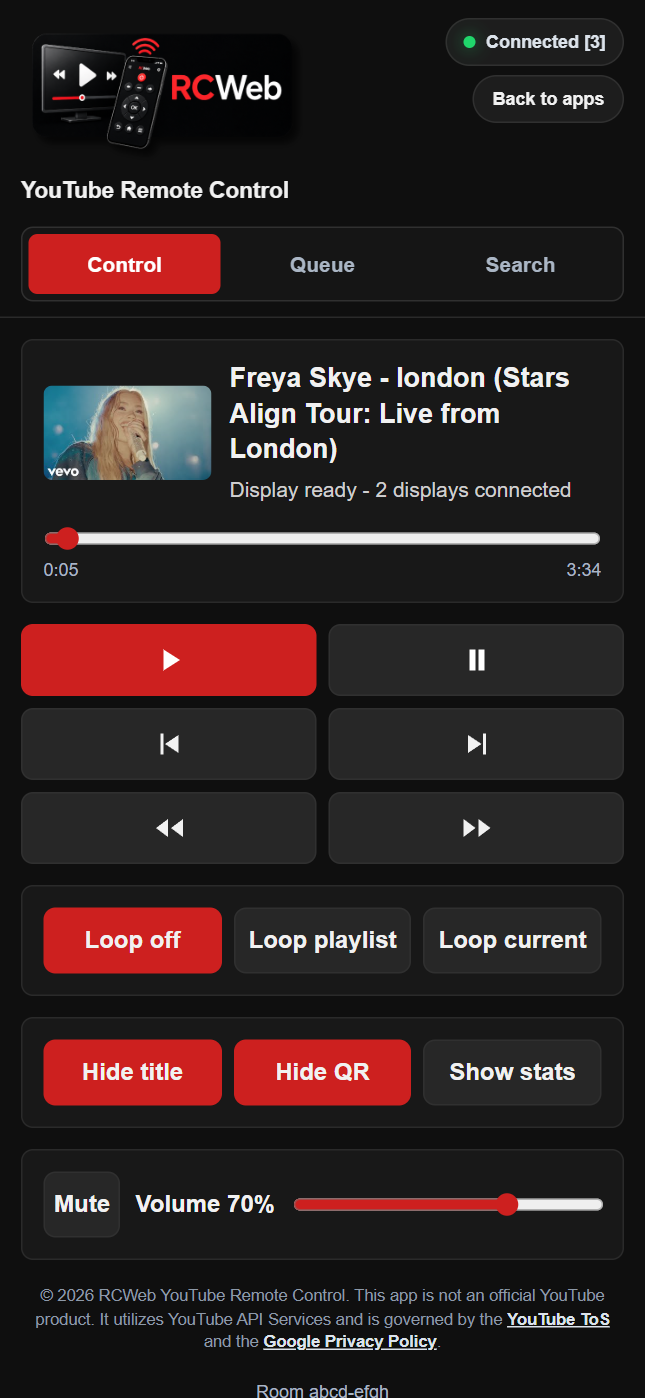
- Use the playback buttons to play, pause, skip, rewind, fast-forward, or seek.
- Drag queue items by their handle to reorder the playlist.
- Use the lower controls to change loop mode, mute, volume, display title, QR code, and stats visibility.
Playback controls
- Play and pause the current video.
- Move to the previous or next queue item.
- Rewind or fast-forward by 15 seconds.
- Seek with the progress slider.
- Select any queued item to start playback.
- Remove individual queue items or clear the queue.
- Reorder the queue by dragging items on desktop or mobile.
Playlist controls
- Paste a YouTube URL and add it to the shared queue.
- Download the current playlist and playback state as a JSON file.
- Import a previously saved JSON playlist.
- Restore a playlist from a previously downloaded file.
- Continue controlling the playlist even when more than one control app is open.
Display controls
- Show or hide the title overlay on the main display.
- Show or hide the QR code on the main display.
- Show or hide the main display's Stats for nerds panel.
- Control mute and volume for the viewers.
- Choose loop off, loop playlist, or loop current item.
Multiple viewers and controllers
The control app sends commands to all youtube display apps in the room while excluding control apps. This means one phone can control many screens, and several phones can add to or operate the same shared playlist.
When you open the controls, they show the current playlist and playback settings. Keep a controller open if you refresh the display so it can restore the queue.
Related app
Use this app with RCWeb YouTube Display (app/youtube).