Cubes Control
Your phone controls one gemstone in Cubes, the territory game for up to six players.
Connect
Launch Cubes from the room's app list or scan its QR code on the shared screen. Each phone receives its own colour and player number. All players must use the same RCWeb room. If six players are already connected, your phone waits for a space.
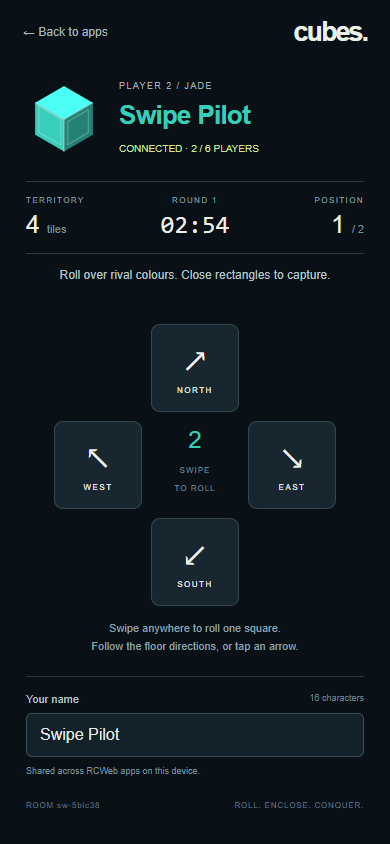
Edit Your name to personalise your cube. Names use up to 16 characters and are remembered across RCWeb apps when browser storage is available. Renaming keeps your colour and territory.
Play
- Swipe anywhere on the controller to roll one square in the nearest floor direction. Only the rough direction matters, so you do not need to start on an arrow or on your cube. Lift your finger and swipe again for another roll.
- You can also tap an arrow. The diagonal arrows match the north, east, south and west directions on the big screen. Buttons, links and the name area keep their usual actions.
- Every landing paints a tile. Close a complete square or rectangular outline in your colour to capture its interior. The smallest outline is 3 × 3 tiles.
- Steal rival tiles and protect your borders. Another cube blocks your path, so roll around it.
- Your phone shows your current territory, rank and the time left. The largest territory wins after three minutes; ties share the win.
The first active player is captain and can start or pause a round. After the result, any player can select Play again. New players may join mid-round.
Arrow keys and WASD also work if you use a computer as your controller. Hold a key or hold an arrow with a mouse to roll repeatedly. To play on a smartphone's viewer screen instead, open Cubes and select Play here, then use the same swipes.
Controls stop when you leave the page or lose connection. Reconnecting or reloading within 20 seconds restores your colour and score; an additional phone or browser tab gets a separate cube.
Use Back to apps to return this phone to the room's app list. The shared screen stays in Cubes.