RCWeb Spacewar 3D
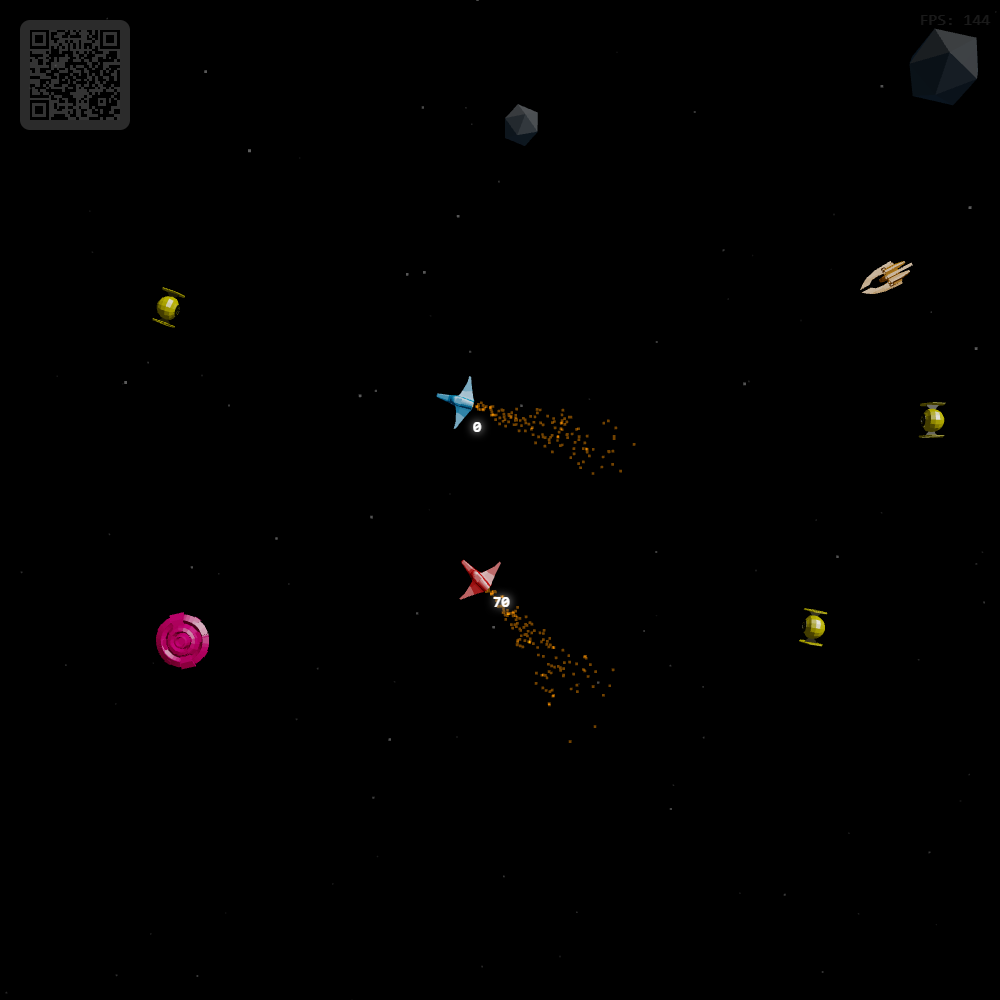
Spacewar 3D is a shared-screen multiplayer space battle for RCWeb. One browser becomes the 3D combat arena, while every phone becomes a flight controller for its own ship. Players dodge asteroids, fight enemy squadrons, collect temporary weapon upgrades, and try to survive a five-wave gauntlet on the same battlefield.
Features
- A shared five-wave space battle.
- Asteroids, enemy squadrons and temporary weapon upgrades.
- Individual scores and respawns.
Screenshot
The Game
Spacewar 3D turns the Spacewar idea into a room-scale cooperative-competitive action game. Each player gets a ship and score, but the whole room shares the same enemy field, wave progression, asteroid hazards, and collectible weapon pickups.
The campaign is built around five waves. As the waves advance, the arena fills with harder combinations of asteroids and enemy types such as hunters, flankers, snipers, and swarms. Clearing the arena advances the wave. Finishing all five completes the run; otherwise the game resets after the final battle report and starts over.
Destroyed asteroids and enemies can drop temporary weapon upgrades, including multi-shot and homing missiles. Those pickups give players a short burst of extra firepower before expiring, which adds a nice scramble for advantage inside the middle of the fight.
How To Play
Open /spacewar3d/ on the shared screen. Players scan the QR code to open /spacewar3d-c/ on their phones in the same room. The phone controller handles turning, thrust, and firing.
Steer your ship through the arena, use thrust to stay mobile, and fire into asteroids and enemy ships. Getting hit or colliding with a hazard costs points and triggers a respawn delay, so surviving matters just as much as landing shots.
As the room clears each wave, the display announces the next one and spawns a tougher mix of threats. Pick up weapon upgrades when they appear, keep your score climbing, and try to stay effective through the full five-wave run.