RCWeb GPS
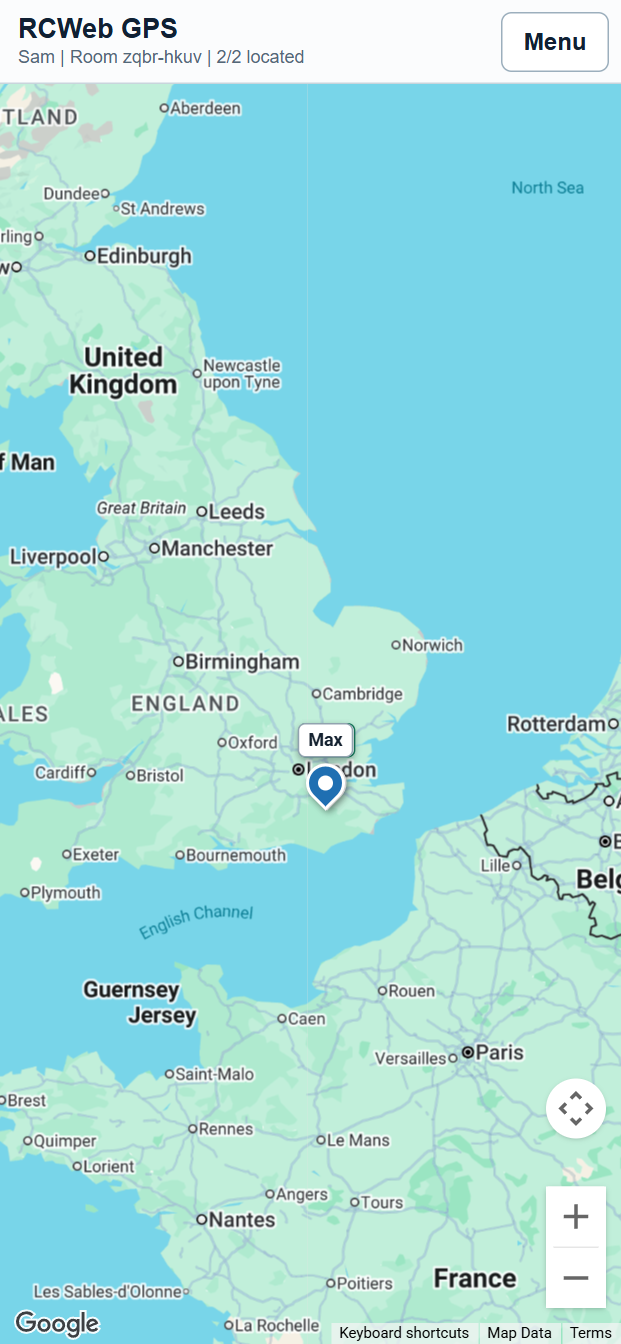
RCWeb GPS lets everyone in the same RCWeb virtual room share live GPS locations on a Google map. It is designed for phones, with the map taking most of the screen and the controls kept in a compact menu.
Screenshot
Features
- See everyone in the room on one shared map.
- Share your own live GPS location after giving the browser permission.
- Identify each person by their saved RCWeb name.
- Select a person to highlight them and keep the map centered on them.
- See whether each pin updated recently or when it was last updated.
- View a GPS accuracy circle around each pin.
- Add a shared meeting point and see each person's distance from it.
- Switch Google Maps layers such as satellite, traffic, transit, and bicycle routes.
- Invite people into the same GPS room with a QR code.
- Inspect detailed location readings such as coordinates, accuracy, altitude, speed, heading and update times.
Getting Started
Open /gps/ on your phone. When the browser asks for location permission, allow it if you want your live position to appear on the shared map.
The app uses your saved RCWeb name as your display label. If you have not set one, it creates a simple default name. You can change it from the menu at any time.
The app remembers you in the same browser after a refresh, so it updates your existing pin.
Everyone must be in the same RCWeb room to see each other. To invite someone, open the menu and choose Invite new user. Scan the QR code or send the displayed link.
Map Pins
Each user appears as a pin with a two-line label. The top line is the person's name. The lower line shows Now when their location has updated within the last minute, otherwise it shows the time of the last update.
Disconnected users are not immediately removed from the map. Their last known position remains visible so the group can still see where they were last reported. If a user stops GPS sharing from the menu, their active location is removed from the room.
Each GPS fix can include an accuracy value from the browser. When available, RCWeb GPS draws a translucent circle around the pin to show the reported accuracy radius.
Selecting Users
Tap a user pin or name label to select that person. The selected user is highlighted, and the map follows them by keeping their latest location centered as updates arrive.
Tap another area of the map to deselect everyone. Choosing Show my location or Show all user locations also exits selected-user follow mode.
Meeting Point
The Meeting point option adds a shared marker to the map. The first time it is shown, it starts at the midpoint of all current user locations.
The meeting point can be dragged to a new position. When anyone moves it, the new position is shared with everyone in the room. While the meeting point is visible, a bar below the top menu shows each located user and their distance from the meeting point, sorted nearest first.
Menu Options
- Change name: Updates the name shown above your pin and remembers it as your RCWeb name.
- Invite new user: Opens a QR code and room link for inviting others.
- Show my location: Centers and zooms the map to your latest GPS fix.
- Show all user locations: Fits the map so every person with a current GPS fix is visible.
- Raw GPS data: Shows detailed location data for everyone currently known in the room, with a Show virtual room information link at the bottom.
- Meeting point: Toggles the shared draggable meeting point. A tick appears while it is visible.
- Satellite: Toggles the map between road view and satellite view with labels. A tick appears when satellite view is on.
- Traffic: Toggles the Google Maps traffic overlay. A tick appears when the layer is on.
- Transit: Toggles the Google Maps public transport overlay. A tick appears when the layer is on.
- Bicycle routes: Toggles the Google Maps bicycle route overlay. A tick appears when the layer is on.
- GPS sharing: Toggles whether your phone is actively sharing its location. A tick appears while sharing is active.
Privacy Notes
GPS data is shared with other browsers in the same RCWeb room. The app remembers a recent position in your browser to help restore your pin after a refresh; it does not keep a route history.
Anyone with the same room link can join that room, so only share the QR code or room URL with people you want to see the map.
Closing the tab, disconnecting, or refreshing leaves your last known pin visible until newer state replaces it or GPS sharing is stopped. Use GPS sharing to stop active sharing from that browser.
Troubleshooting
- If you do not appear on the map, check that the browser has location permission for the site.
- If your position is inaccurate, wait a few moments or move somewhere with better GPS reception.
- If the meeting point cannot be shown, wait until at least one user has shared a GPS location.
- If map layers do not appear, check that Google Maps has loaded and that the selected layer is available in your area.
- If you accidentally denied permission, use your browser or operating system settings to allow location access, then choose GPS sharing again.
- If you cannot see someone else, confirm both phones are using the same room code in the URL.