Racer Control
Drive Racer from your phone while watching the game on the room's Racer display. The controller contains buttons, settings and race status only; game graphics and sound stay on the display.
Features
- Proportional steering and simultaneous touch controls.
- Accelerate, brake/reverse and hold-to-use Nitro.
- Engine-temperature feedback and shared race controls.
Join and drive
Open Racer on a display in your room. Launching it from the RCWeb app list brings your controller here automatically, or scan the viewer's QR code.
Enter a driver name. Your player number and colour match your car and window on the main display. Up to six phones race simultaneously in the same world. The first connected player chooses the style; any joined player can start or restart the group. The main display can also manage the race. New drivers join a running race safely behind the pack. If six places are occupied, wait for a place to open.
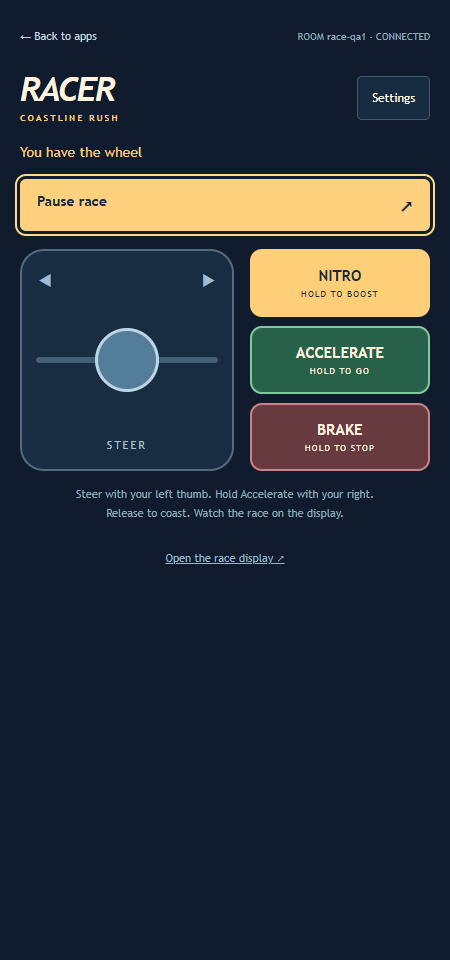
- Drag the joystick on the left with your left thumb. Steering is proportional and springs back to centre when released. It cannot move a stationary car sideways.
- Hold Accelerate on the right to build speed. Release it to coast; the car never accelerates automatically.
- Hold Brake / Reverse to stop, then continue holding to reverse out of a blocked lane. Reverse is limited to a quarter of normal top speed. Release to coast; Accelerate drives forward again. Brake takes priority over both Accelerate and Nitro.
- Hold Nitro to drive with twice the normal acceleration and 50% higher top speed. You do not need to hold Accelerate as well. There are no charges or timed bursts. Release to coast, or keep Accelerate held to return to normal driving.
- Tap Pause race to pause, then Resume race to continue.
- Open Settings to change the display's visual style. Cruise and Arcade driving modes and one of five tracks are chosen before a new race.
- Tap Enable sound on the Racer display to hear music and race effects there.
Choose Coastline Rush, Canyon Heat, Alpine Ascent, Emerald Run or Volcanic Night. Everyone starts on a staggered grid, rotating places between races. The race continues until all remaining drivers finish or retire. If anyone finishes, any joined player can choose Next level to advance the whole group. After track 5, New game restarts everyone on track 1. Results stay visible until the next race.
The joystick and three right-side buttons support simultaneous touches in portrait and landscape. Releasing a touch, cancelling it or losing the connection releases the controls. Keyboard play uses left/right or A/D for steering, Up/W to accelerate, Down/S to brake and hold Space/Shift for Nitro.
Engine temperature
Watch ENGINE TEMP on the display or controller. Normal running temperature is 80°C. Nitro adds 7.5°C per second of active boost: eight uninterrupted seconds will reach the 140°C limit. Releasing Nitro cools the engine by 4.8°C per second toward 80°C, including while driving with normal acceleration. Pausing freezes the temperature.
At 125°C, the gauge turns red and shows HOT beside the temperature: release Nitro to cool down. At 140°C, your engine blows and your car stops; other players continue. Your controls disable until the next race. Fire appears on the main display, with the occupants kept clear of the flames. Your car remains a solid obstacle while you are connected.
Names and reconnecting
Names can be up to 16 characters and are shared with other RCWeb apps. Refreshing the same browser tab can keep your car if you reconnect within five seconds. After a longer absence, rejoining adds a new car behind the pack. Display recovery pauses the race; resume when it is ready.
Back to apps returns only this phone to the room's app list. Open the race display opens a viewer when the room needs one.