RCWeb Remote Controller
Control your room's shared displays from a phone or tablet. Launch apps, show media, open web content or change the screen colour.
Screenshot
Overview
This app acts as the master remote control for an RCWeb room. From a phone or tablet, it allows you to instantly push colors, media, web embeds, code, or switch between full RCWeb apps on all connected shared displays.
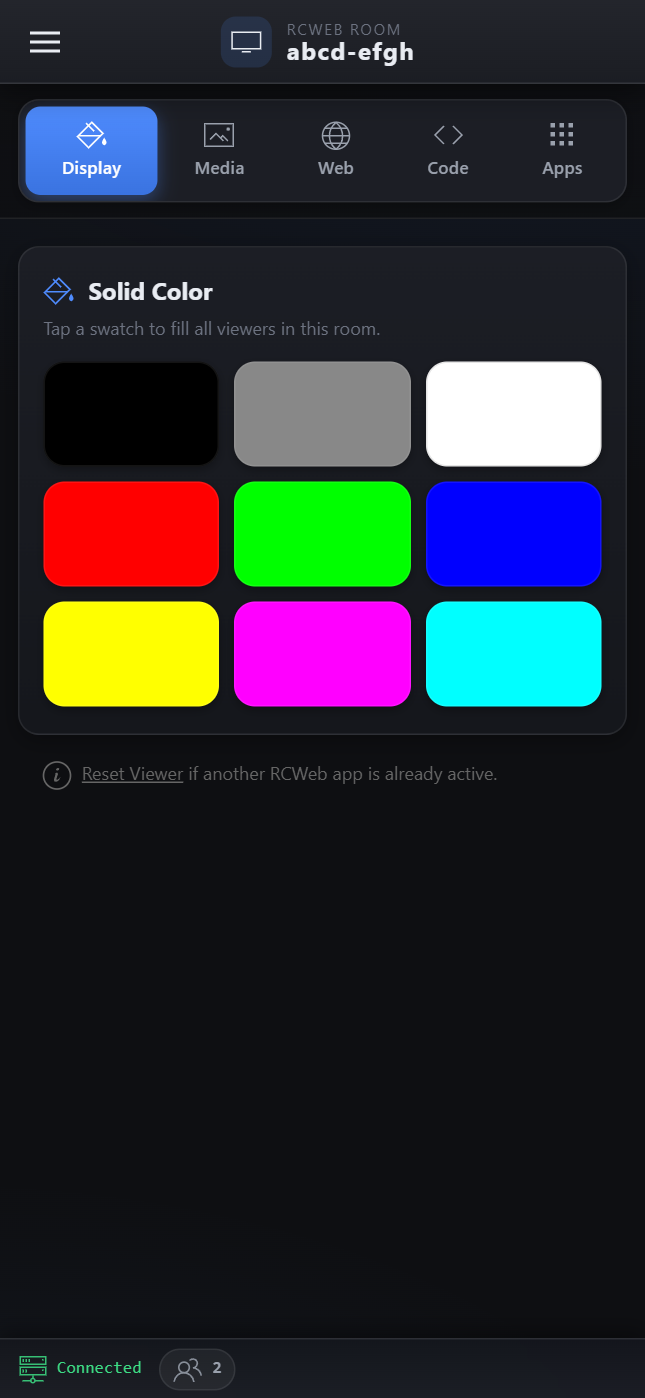
Use the side menu, section tabs and searchable app launcher to find the controls you need. A fixed bottom status bar shows your connection status and the number of active clients in the room.
How to use
- Open
/v-c/(or/v-c/?r=<room>) on a smartphone or tablet browser. - Ensure you have one or more
/v/(Viewer) apps running on a shared display or desktop browser in the same room. - Tap the segmented section tabs (Display, Media, Web, Code, Apps) to switch between control panels.
- Display: Tap a solid color swatch to instantly fill the viewer.
- Media: Paste an image/video URL or upload one from your device to push it to the viewer.
- Web: Embed websites inside an iframe or force the viewer to redirect to a new URL.
- Code: Type raw HTML or JavaScript and execute it on the viewer instantly.
- Apps: Browse the categorized App Launchpad, use the search bar, or filter by tags (Games, Media, Collab, Tools, Experimental) to launch a new app across the room.
- Open the off-canvas menu (top left) or look at the Apps > Tools section to "Reset Viewer" and return it to its default state.
Features
- Categorized App Launchpad: A touch-friendly grid of all available RCWeb apps, grouped into categories.
- Live Search & Filters: Instantly find apps using the search bar (which scans names and hidden tags) or filter pills.
- Streaming Uploads: Send local images or videos directly to viewers without prior uploading. Keep this tab open while viewers load or play files you selected.
- Mobile-Optimized UI: Designed specifically for a phone screen with touch-friendly buttons, off-canvas navigation, and clear visual feedback.
- Real-Time Status: The bottom status bar shows the connection state and dynamically updates with the count of clients currently in the room.
Related app
Use this app to control the RCWeb Viewer (app/v) or any other RCWeb app in the room.