RCWeb Stack Fall Controller
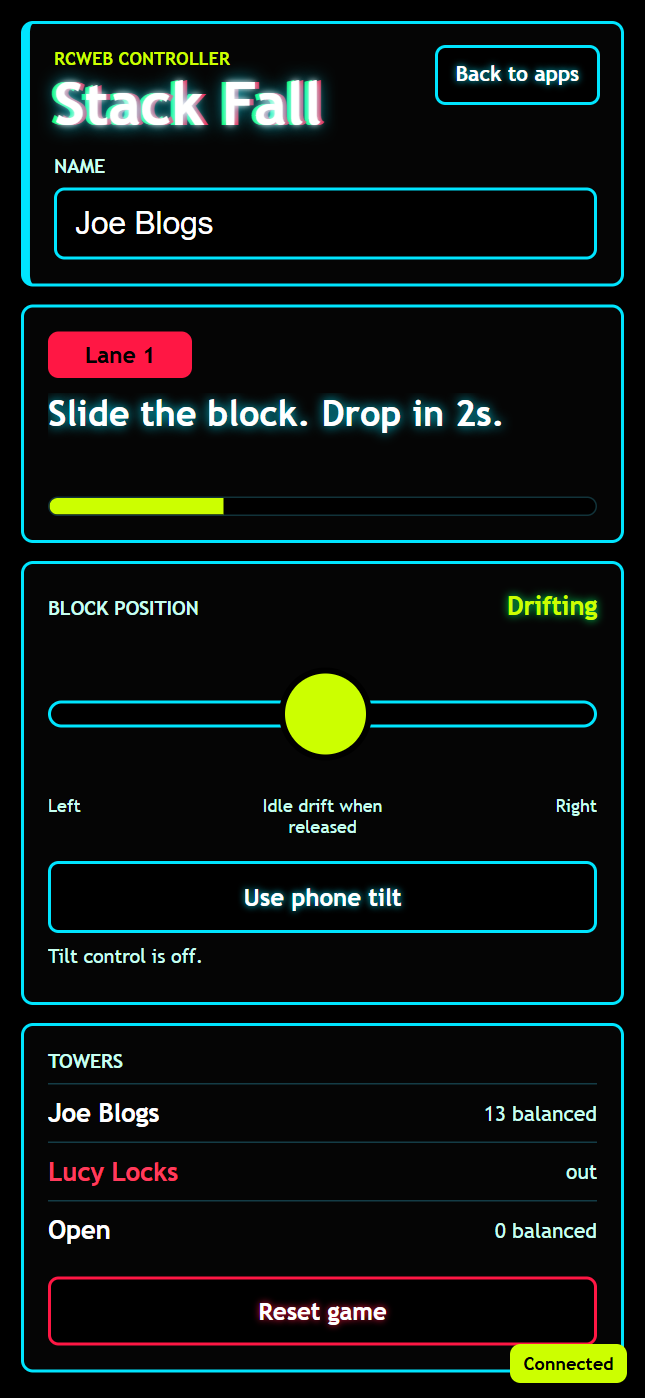
The Stack Fall Controller (app/stack-fall-c) is the phone companion for the Stack Fall display. Each player joins a lane, enters a saved display name, and controls the horizontal position of the next falling piece before the shared countdown releases it.
Open the shared display at /stack-fall/?r=<room> and scan its QR code, or open /stack-fall-c/?r=<room> directly on a phone in the same RCWeb room. The controller includes a Back to apps link to /v-c/?r=<room>#apps, matching the navigation pattern used by other RCWeb controller apps.
The controller shares the display's OLED-friendly visual style: black panels, saturated lane colors, cyan borders, lime countdown accents, and a neon title treatment.
Features
- Slider aiming for an assigned lane.
- Optional phone tilt with a comfortable centre position.
- Drop countdown and balanced-piece scores.
Screenshot
How To Play
After joining, watch the lane label and status text. When the display begins a drop cycle, use the slider to aim the piece before the countdown reaches zero. The slider sends analog movement to the display while it is touched. Releasing the slider makes the piece drift on its own again.
If phone orientation is supported, tap Use phone tilt. Hold the phone naturally for the first reading to set center, then tilt left or right to move the piece. Use small tilts to refine your position.
The Reset game button sends a reset request to the display. The Back to apps button returns to the RCWeb app picker for the same room.