Fishtank Control
Tend a shared Fishtank aquarium from your phone. Several visitors can change the same tank together, with no account or name required.
Features
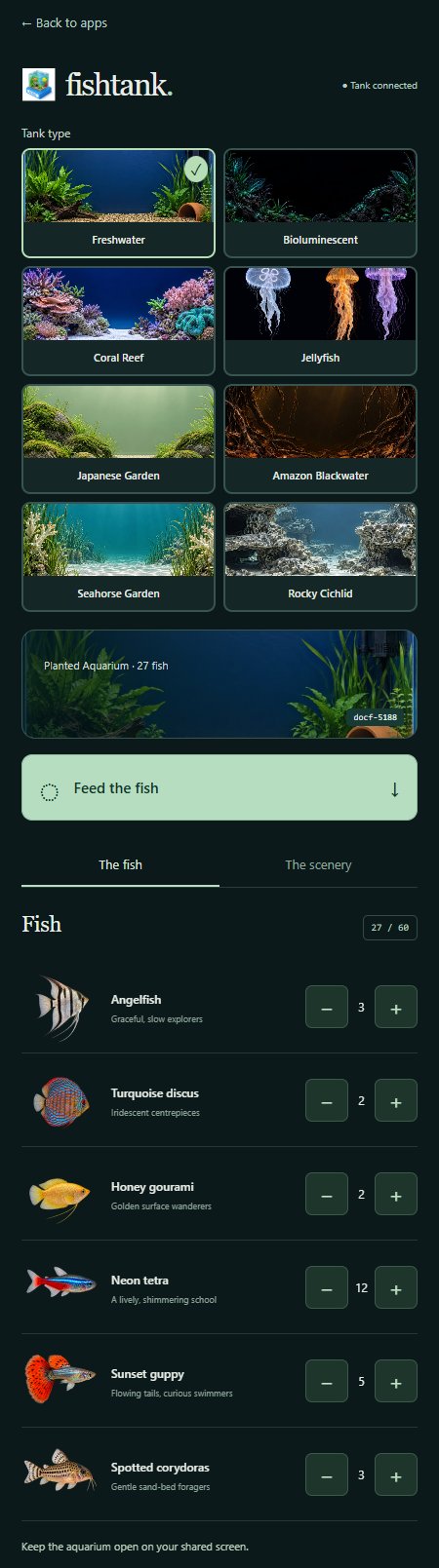
- Switch between eight aquarium themes, each with its own remembered choices.
- Add or remove inhabitants with large plus and minus controls.
- Feed fish, jellyfish or seahorses and watch them follow the food.
- Adjust scenery, lighting, water flow, bubbles and display panels.
How to use
- Open Fishtank on the shared screen and scan its QR code.
- Choose Tank type: Freshwater, Bioluminescent, Coral Reef, Jellyfish, Japanese Garden, Amazon Blackwater, Seahorse Garden or Rocky Cichlid.
- Use the plus and minus buttons to change the population. A tank holds up to 60 inhabitants.
- Choose the scenery and lighting, adjust the flow, or switch bubbles on or off.
- Tap Feed the fish, allowing eight seconds between servings.
The available species and scenery change with the tank type. You can also hide the heading and QR panels independently. For a guide to the themes, see Fishtank.
Keep at least one aquarium display open. Your controls show the shared tank's choices and update after reconnecting. If a change is not confirmed, check the display before trying again.
Screenshot