RCWeb Weather Control
Weather Control is the phone-friendly companion to the weather viewer. It lets one or more phones in a room change the location, choose units, decide which dashboard pages cycle (and how long each one stays on screen), and step through pages by hand.
Features
A single scrolling page with five sections:
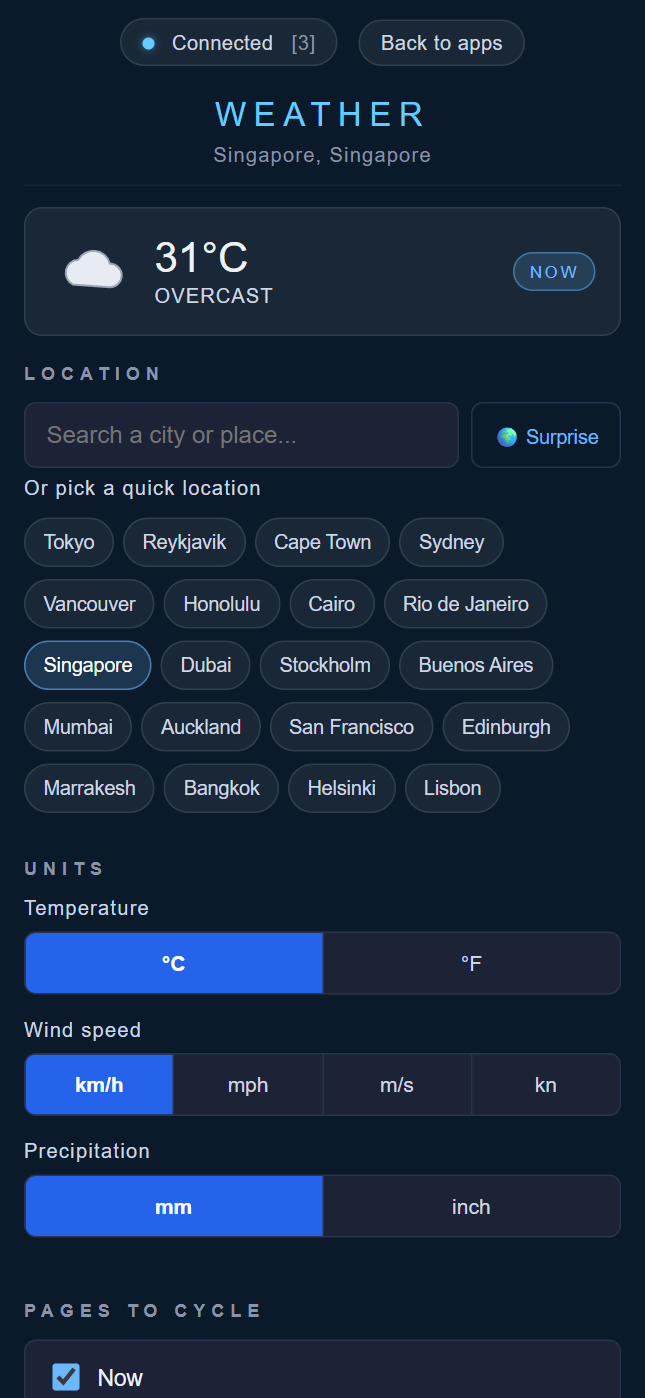
- Live preview — a small pill at the top showing the current temperature, condition icon and which page is on screen, kept up to date with the display.
- Location — a place-name search box; tap a result to send it to the viewer. Plus a quick-pick list of the curated random cities and a Surprise me button that asks the viewer to pick a fresh random location.
- Units — segmented controls for temperature (°C / °F), wind speed (km/h, mph, m/s, kn) and precipitation (mm / inch). The display refreshes its data when units change.
- Pages to cycle — checkboxes for each dashboard page (Now, Hourly, 7-day, Conditions, Sun & sky), plus a slider for the time spent on each page (5–60 seconds).
- Now playing — Prev / Next buttons and a Refresh data button.
How to use
Scan the QR code on the Weather display. Search for a location or choose Surprise me, select your units, and tick the pages you want. Set a page duration from 5 to 60 seconds or browse using Prev/Next. Refresh data requests an updated forecast.
Screenshot