Golf

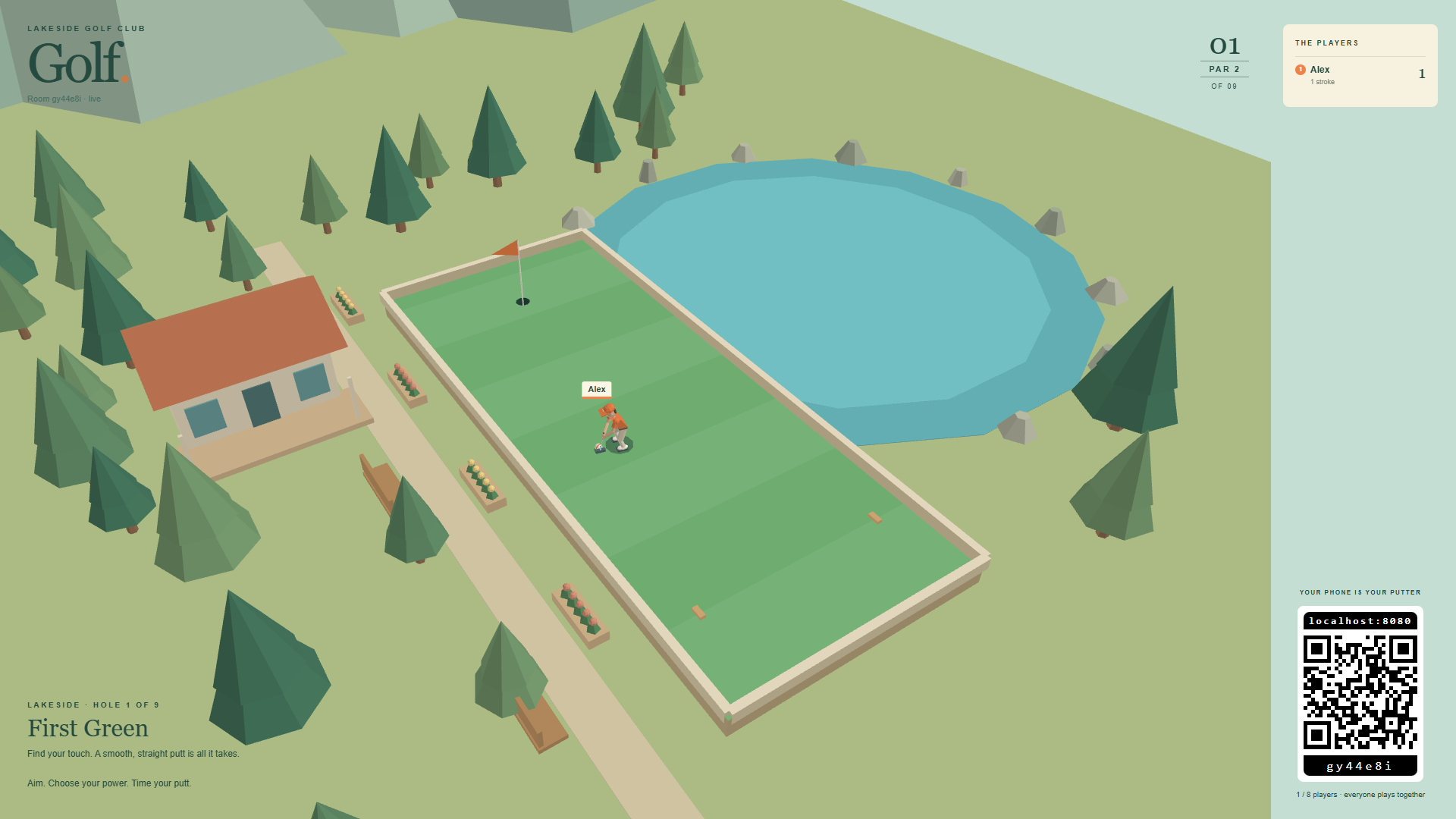
Nine holes beside the lake. Up to eight friends play mini golf together on the shared screen, each with their own third-person course view and putter on a phone.
Features
- Nine lakeside mini-golf holes for up to eight players.
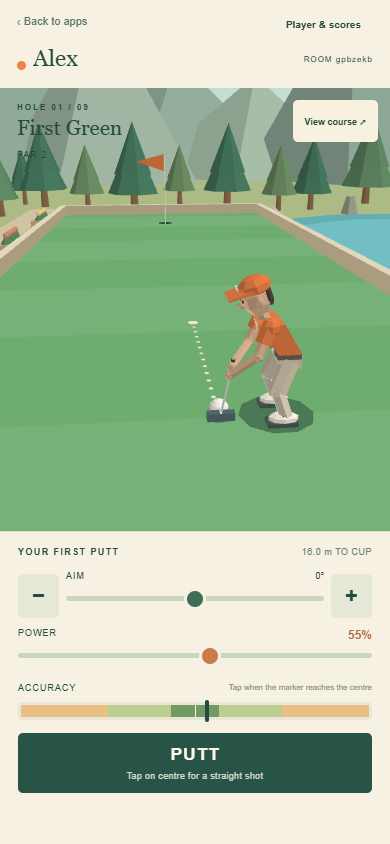
- A personal 3D course view, aim, power and accuracy controls on each phone.
- Simultaneous play around the course, with turns at shared ball positions.
- Round scores, penalties and automatic progression between holes.
Join the green
- Launch Golf from the Arcade section of Viewer Control, or open the shared screen.
- Scan its standard RCWeb QR panel. The invitation opens Golf Control in the same room. Existing room controllers move to Golf Control automatically.
- The first connected player is the captain: tap Start the round directly on the main phone screen. Names can be changed under Player & scores whenever you like. The shared screen also has a Start button.
For phones on your Wi-Fi, open the viewer using the server's LAN address. A QR code containing localhost points to the phone itself and cannot reach the server. Keep the viewer open and visible while playing.
Take a putt
- Aim: drag sideways over your 3D view, move the aim slider, or tap minus/plus for one-degree adjustments. A dotted line shows the intended direction.
- Power: choose 1–100%. Gentle putts have finer control near the bottom of the range.
- Accuracy: the marker sweeps continuously across the timing bar. Tap PUTT at the centre to hit straight. Missing left or right bends the initial direction to that side; powerful shots magnify the error. There is no random error added to a shot.
- View course: inspect the whole hole, then return to your golfer.
Your golfer takes a bent-knee stance and rocks the shoulders, arms and putter together. Higher power produces a longer backswing and follow-through. Coloured markings rotate with the ball as it rolls and bounces, the camera follows it, and the golfer walks into position for the next putt. Wait for your own ball to settle. Everyone else can keep playing. Mouse controls and left/right arrow keys also work; Space takes a putt when the player menu is closed.
A slow connection can delay the start of a shot. If the connection is lost, controls pause until the display is available again.
Everyone starts each hole at the same tee and takes turns there. Balls close enough for golfers or clubs to overlap also share a local queue. Waiting golfers stand apart nearby and leave small coloured ground markers in place of their balls. The controller names the active golfer and disables putting until your golfer has stepped into position. A short putt or water return goes behind golfers already waiting at that spot. Players elsewhere keep playing simultaneously.
Scoring
Lowest total strokes wins. All players share the current hole and advance together after a five-second score pause. Balls do not collide with other players. Golfers sharing a ball position wait nearby and take turns, including at the common starting tee.
Sink a putt to send a burst of confetti up from the cup. It flutters down and settles around the hole on both the shared screen and phones.
After finishing, your golfer walks around obstacles and steps over the low boundary wall to the spectator terrace. Eight spaced places, a bench and flower planters give everyone room to watch. Your phone switches to a view back across the green while the remaining golfers play.
Water or leaving the course adds one penalty stroke and returns the ball to its previous safe position. Sandy patches slow the ball more than the green. The maximum is ten strokes per hole. A ball still moving after 35 seconds is visibly recovered to prevent an indefinite wait.
Players can join during a round. Earlier holes remain unplayed and their round is marked partial, with an asterisk beside their name. Only completed nine-hole rounds enter the final winner calculation; equal totals share the win. A player disconnected for twelve seconds is marked away. Their unfinished hole stays unplayed if the others move on. Their place and recorded scores are reserved for reconnecting. When everyone is away the round pauses.
Refresh the phone in the same browser tab to recover your player and scores while the display remains open. Names use your shared RCWeb name.
Refreshing or reopening the only display starts a fresh lobby at hole one. Connected phones rejoin with their names, but previous round scores are cleared and aim, power and camera settings reset. Press Start the round when everyone is ready. If another Golf display remains open, it can keep the live round and scores running.
Back to apps returns only that phone to the app menu in the same room.
Browser support
A browser with working WebGL 1 graphics is required. Older supported displays use reduced detail automatically. If graphics cannot start, the app shows a message. Keep the shared display visible while playing.
The course
- First Green — par 2: learn power and timing on an open green.
- Bank Holiday — par 3: turn an L-shaped corner using the cushions.
- Twin Hills — par 3: judge two crests and the downhill roll.
- Stone Garden — par 3: choose a line through the rocks.
- Mill Run — par 3: time rotating sails or use the right-hand passage.
- Lakeside Bridge — par 3: cross the narrow bridge or follow the safe shore.
- Cascade Jump — par 3: carry the stream and control the landing.
- The Bowl — par 3: use the sloped green to curve towards the cup.
- Clubhouse Challenge — par 4: descend past angled walls to the final flag.