Astra Craft
Build a world together from your phone or desktop. Astra Craft is a first-person creative game: explore gentle hills, lakes and scattered trees, then place or remove blocks freely. The landscape is 128 × 128 blocks with a 48-block build ceiling. Pigs, cows and chickens wander nearby.
Features
- A shared creative world with hills, lakes, trees and wandering animals.
- Eight building materials with unlimited supplies.
- Walking, jumping and creative flight.
- Touch and keyboard controls, with player names and outfit colours.
- Automatic saves for each room on this browser.
Get started
Open Astra Craft, wait for the world to load, then use the movement and look controls to explore. Choose a material along the bottom and aim at a nearby block to start building. Use Options → Invite players to bring friends into the same world.
Move, look and build
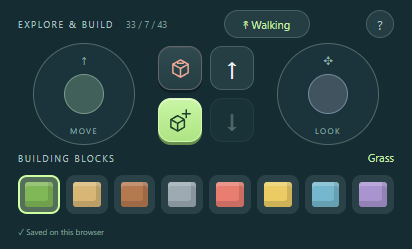
- MOVE, on the left: Drag the pad to walk forward, backward or sideways.
- LOOK, on the right: Drag to turn the camera. You can also drag an unobstructed part of the world.
- Cube −: Remove the block under the crosshair.
- Cube +: Place the selected material beside the targeted block.
- ↑: Jump while walking; hold to rise while flying.
- ↓: Hold to descend while flying. Disabled when walking.
- Walking / Flying: Tap to switch between walking and creative flight.
- Eight block swatches: Choose Grass, Sand, Wood, Stone, Coral, Sunflower, Sky or Lavender. Supplies are unlimited.
Aim the centre crosshair at a block within eight blocks. The red outline marks the block you can remove; the green outline previews where a new block will appear. Choose a swatch, then press Cube +. A disabled action means there is no reachable target or valid placement space. You cannot place blocks inside yourself or another known player.
Walking includes gravity, jumping and smooth automatic steps up one-block ledges. Walls, trees and ceilings stop you in both walking and flying modes. Water supports your feet: walk across its surface without sinking. Animals are scenery; there is no combat or inventory to manage.
Play in either orientation
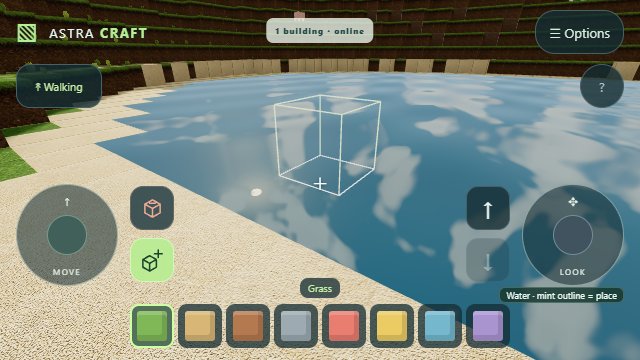
In portrait, the controls sit below the world. In landscape, including desktop browsers, the world fills the viewport and the controls overlay its edges. Move and building controls stay on the left; looking and jump/flight controls stay on the right so you can move and jump together. Block choices stay along the bottom, leaving the centre clear for aiming.
Keyboard controls
- W, A, S, D: Move.
- Arrow keys: Look.
- Space: Jump / fly up.
- Shift: Fly down.
- F: Toggle walking / flying.
- E / Q: Place / remove.
- 1–8: Select a block.
Invite friends and customize your player
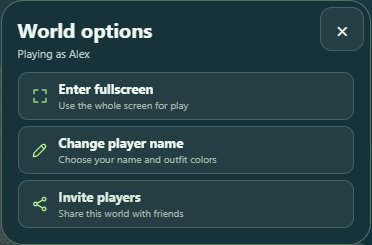
Open Options at the top of the game:
- Enter fullscreen uses the whole display where supported. Use the same option to leave fullscreen.
- Music on / Music off toggles the gentle generated soundtrack. Your choice is saved on this browser; movement sounds and animal calls stay on.
- Change player name lets you edit your name, top color and pants color. Press Save player to apply them. Other players see your textured block character with your name above its head; your own view stays first person.
- Invite players opens the standard RCWeb QR panel. Friends scan it or use Copy invite link to join the same world. Everyone runs the same app; no separate control app is needed.
Sound begins after your first tap or key press. Soft footsteps follow your movement, with different sounds on stone and water. Placing a block makes a soft tap; removing one makes a short crumble. Jumping and landing have short effects, and nearby pigs, cows and chickens occasionally call. Flying is quiet. Audio pauses while the app is hidden.
Install Astra Craft
Use your browser's Install app or Add to Home Screen option to give Astra Craft its own app icon. On iPhone or iPad, use Share → Add to Home Screen. Open the world you want to keep before installing: the app's launch link remembers that room.
Installed launches request landscape fullscreen, with an Astra Craft icon and matching dark launch background. Browsers that do not support those settings use their own app display and orientation behavior. Installation requires HTTPS (or localhost for development). A connection to the RCWeb server is required to launch; installation does not provide offline access.
Save and return
Changes save automatically on this browser, separately for each room. Keep or bookmark the invite link to return to the same world. Your position and walking/flying mode are saved too.
Connected players can build at the same time. Changes to different blocks are retained; if two players change the same block, one result wins consistently. Offline edits merge when you reconnect.
World saves live in participating browsers, not on the server. Clearing browser data removes that browser's copy; another connected player with a saved copy can restore the shared edits. Watch the save status for storage errors.